
Notes on Continuing Extension Development for Next Design V3.0
If you continue extension development for V3.0 without updating to V3.1, you need to update the settings of your extension development project. (This is not required if you use pre-built extensions as-is.)
Settings need to be changed in the following cases:
- Creating projects using the following project templates:
- Next Design Extension project template
- Next Design Extension (Extension Points) project template
- Creating projects using NDExt commands
Projects created using the above method are configured to use the latest version of the extension development package. The extension development package is also updated along with the V3.1 update. To build extensions for V3.0, you need to change your settings to use the V3.0 version of the extension development package.
If you do not update your settings, the following error message will appear and the build will fail.
Error | NU1202 | Package NextDesign.Desktop 3.1..***** is not compatible with netcoreapp3.1 (.NETCoreApp,Version=v3.1). Package NextDesign.Desktop 3.1..***** supports: net6.0-windows7.0 (.NETCoreApp,Version=v6.0)
Please update your extension development project settings as follows:
Uninstall the following packages currently in use in your extension development project, and reinstall the V3.0 versions of those packages.
| Target Package | V3.0 Version |
|---|---|
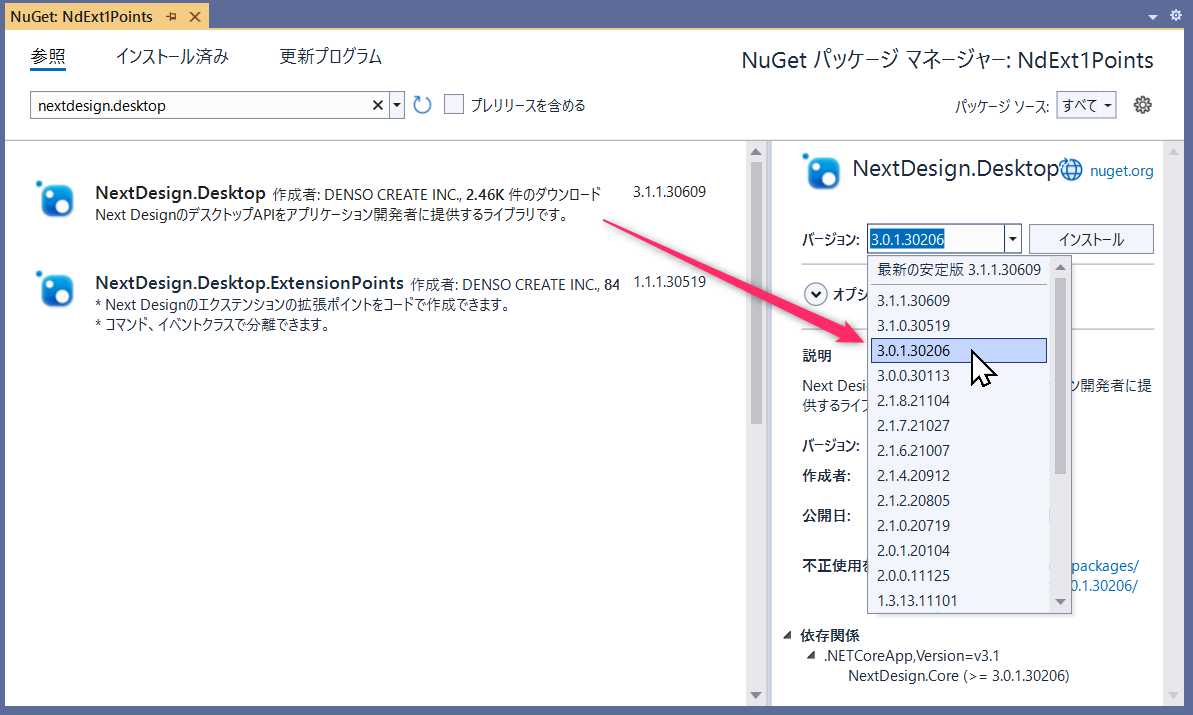
| NextDesign.Desktop | 3.0.1.30206 |
| NextDesign.Core | 3.0.1.30206 |
| NextDesign.Desktop.ExtensionPoints | 1.0.1.20202 |
Follow the steps below to change settings in Visual Studio.
-
Open the solution in Visual Studio.
-
Right-click the project in the Solution Explorer and select [Manage NuGet Packages] to open the NuGet Package Manager.
-
[Installed] Select the tab and uninstall the corresponding package above.
-
[Reference] Select the tab and search for the corresponding package.
-
Specify the V3.0 version for the corresponding package and install it.
-
Run the build and verify that it succeeds.
Note that configuration changes can be made even before the V3.1 release. We recommend making the necessary adjustments in advance.
That is all.