
Notes on Updating from Next Design V3.1 to V4.0
Table of Contents
Project files
Opening a project file created in an older version in V4.0 will convert it to the file format of the latest schema version, allowing you to continue using it. If you overwrite and save a project file in V4.0, it will no longer be openable in V3.1.
Extended Contents
Extended content will also be updated in conjunction with the Next Design core update. Please update your pre-installed packages.
On-premise floating license
The following security and availability enhancements will be made to the on-premise floating license.
- Hiding connection destination information for the license server
- Restrictions on available client PCs
- Improved availability through secondary servers
As a result of the above, the usage method for on-premise floating licenses will change as follows.
- The license administrator uses a dedicated tool to create a license configuration file and distributes it to clients.
- Users register their license from the license management screen using this license configuration file.
- When using a secondary server, request additional product keys to be issued and reflect them in the license configuration file.
If you are using on-premises floating licenses in V4.0, please follow the steps below.
Action by the license administrator
- Download and install the license configuration file creation tool.
- Create a license configuration file using the tool and distribute it to users.
(This procedure is not required if you have already activated your license online or if you continue to use the previous version.)
User response
- Start Next Design V4.0.
- IF YOU HAVE USED THE ON-PREMISE VERSION OF THE FLOATING LICENSE IN THE PREVIOUS VERSION, THE FOLLOWING ERROR MESSAGE WILL APPEAR. IN THIS CASE, CLICK THE "OK" BUTTON.
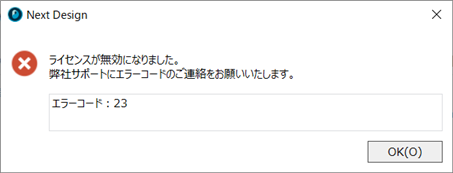
- Perform license registration by specifying the license configuration file on the license registration screen.
supplementary information
- THE SAME LICENSE SERVER CAN BE USED EVEN IN ENVIRONMENTS WHERE THE PREVIOUS VERSION AND V4.0 ARE MIXED.
- If you wish to use a secondary server, please contact the Next Design sales office.
Extensions
NET 6 and .NET 8 are also considered compatible, so extensions that have been developed will basically work without modification.
However, if you wish to continue to use extensions that meet the following conditions with V4.0, please check the contents and take action as necessary.
- IF YOU ARE USING AN API THAT CHANGES BEHAVIOR
- If you are using the ExtensionPoints library
- When referring to the library bundled with Next Design itself
IF YOU ARE USING AN API THAT CHANGES BEHAVIOR
The following APIs will behave differently in Next Design V4.0. If you are using these APIs, please check to see if they affect the operation of your extensions and revise your processing as necessary.
| API | terms | Before change | After change |
|---|---|---|---|
| IModel.SetRichTextField method | Specify "html" for the format | Only the value in HTML format is set. | The value in TEXT format is also set at the same time as the value in HTML format. |
| ↑ | ↑ | To the set value <body> The value is set even if it does not contain tags. |
To the set value <body> If tags are not included, an exception occurs and it will not be set.For details on the set values,refer to this. |
| ↑ | Specify "xaml" for the format | The value in XAML format is set. | The value in XAML format is not set (it terminates successfully without any processing). |
If you are using the ExtensionPoints library
If your extension development project uses the ExtensionPoints library, please update it to the V4.0-compatible version as follows.
| Target Package | V4.0-compatible version |
|---|---|
| NextDesign.Desktop.ExtensionPoints | 1.2.2.41030 (Planned for release) |
When referring to the library bundled with Next Design itself
If your extension development project does not reference any libraries bundled with Next Design other than the ExtensionPoints development package (*1), the following confirmation is not required.
If you are developing an advanced extension and referencing the same libraries bundled with Next Design in addition to the extension development package, the version of the library referenced at runtime may change due to version upgrades of the bundled libraries.
Please follow the rules below to check the version of the library referenced at runtime, and verify that your extension works correctly with that version.
| Bundled with Extension (A) | Bundled with Next Design (B) | Library Version (New/Old) | Referenced Version |
|---|---|---|---|
| - | Included | - | (B) |
| Included | Included | (A) is newer than (B) | (A) |
| Included | Included | (A) and (B) are the same, or (B) is newer than (A) |
(B) |
(*1) Extension development packages: NextDesign.Core, NextDesign.Desktop, NextDesign.Desktop.ExtensionPoints
(*2) For details on the libraries included in Next Design V4.0, please contact us via Technical Support.
That is all.