
Notes on Developing Extensions for Next Design V4.0
Summary
If you are developing an extension for V4.0 in order to continue using V4.0 without updating to V5.0, you need to change the extension development project settings.
(No changes are required if you use pre-built extensions as-is)
Target
You need to change the settings in either of the following cases.
- Create a project using the following Visual Studio project template
- Next Design Extension project template
- Next Design Extension (Extension Points) project template
- Creating projects using NDExt commands
Symptom
Projects created using the above method are configured to use the latest version of the extension development package.
Along with the update to V5.0, the latest version of the extension development package is also updated to the V5.0 package.
Therefore, when building an extension for V4.0, you need to change your settings to use the V4.0 compatible version as your extension development package.
If you build without changing the settings, the latest V5.0 package will be used. If you install that extension and launch Next Design V4.0, the following error message will be displayed and the extension will not function.
Failed to activate the extension "........" (Unable to load one or more of the requested types. Could not load file or assembly 'NextDesign.Desktop, Version=5.0.x.xxxxx, Culture=neutral, PublicKeyToken=null'. The specified file could not be found.)
Solution
To avoid the above error, please update the extension development project settings as follows.
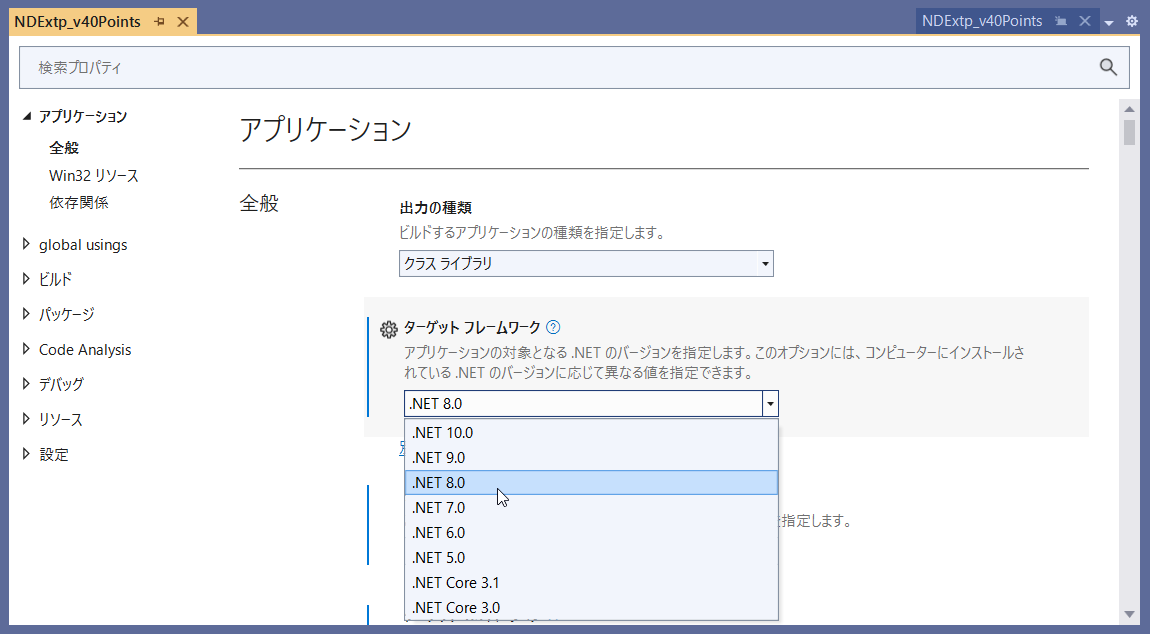
Specifying the Target Framework
Please configure the target framework for your extension development project as follows.
| Item Name | Setting value |
|---|---|
| Target Framework | .NET 8.0 |
Follow the steps below to change settings in Visual Studio.
- Open the solution in Visual Studio.
- Right-click the project in the Solution Explorer and select [Properties].
- In the navigator, select [Application] > [General], and change the [Target Framework] to the setting value above.
Specify Version for Used Package
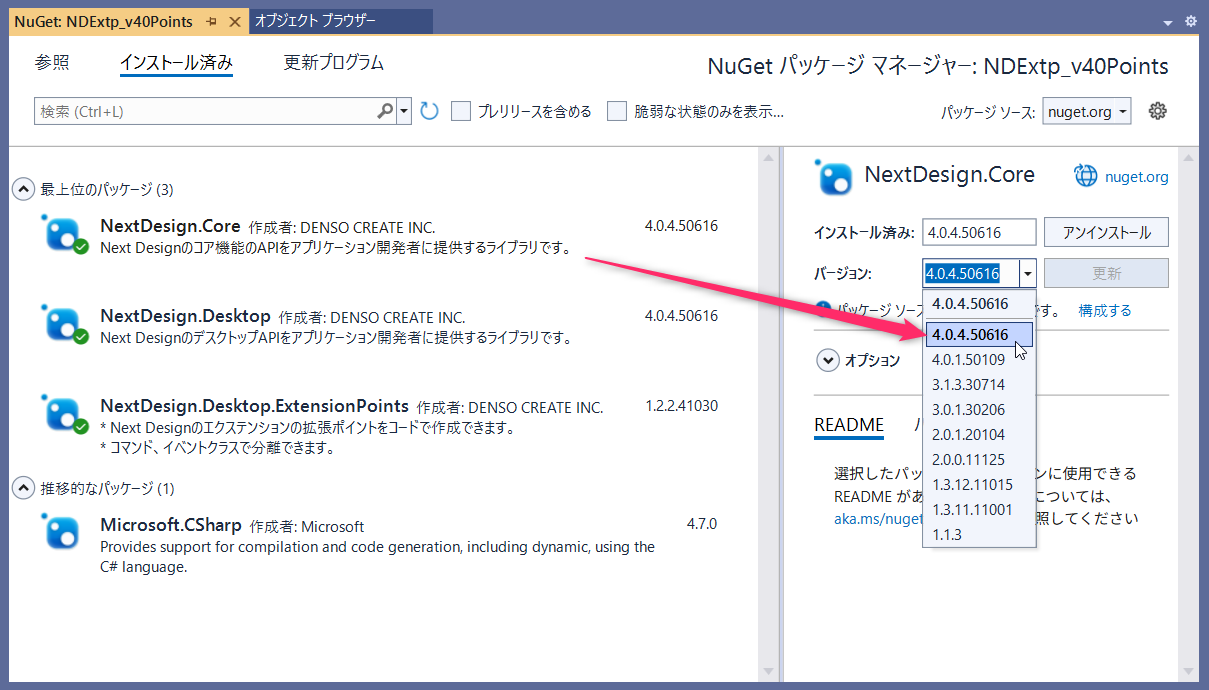
For the following packages used in the extension development project, please explicitly specify the version to use the V4.0 compatible version.
| Used Package | V4.0-compatible version |
|---|---|
| NextDesign.Desktop | 4.0.4.50616 |
| NextDesign.Core | 4.0.4.50616 |
| NextDesign.Desktop.ExtensionPoints (*) | 1.2.2.41030 |
(*) Not required if you are not using the ExtensionPoints library.
Follow the steps below to change settings in Visual Studio.
- Open the solution in Visual Studio.
- Right-click the project in the Solution Explorer and select [Manage NuGet Packages] to open the NuGet Package Manager.
- Select the [Installed] tab, specify the above version for the corresponding package, and click the [Update] button.
- Run the build and verify that it succeeds.
Supplementary Notes
Extensions updated with the above settings will work in both V4.0 and V5.0.
That is all.